We’re proud to announce the release of version 10.2.9 of our performance testing tool for Video Streaming servers (HLS, MPEG-DASH, HSS, HDS).
This release brings significant improvements for modern streaming formats, including enhanced HLS support with EXT-X-MAP and EXT-X-START tags, low-latency DASH optimizations, fixes for HLS Interstitials ad insertion, along with bug fixes that improve test accuracy and reliability
Let’s explore what this version brings to your performance testing workflow.
New Features
EXT-X-MAP Support for HLS
What is EXT-X-MAP?
The EXT-X-MAP tag is a crucial component in modern HLS streams, particularly for fMP4 (fragmented MP4) based content. It specifies where to find the Media Initialization Section, which contains essential codec and track information required to decode media segments.
The EXT-X-MAP tag specifies how to obtain the Media Initialization Section required to parse the applicable Media Segments. It applies to every Media Segment that appears after it in the Playlist until the next EXT-X-MAP tag or until the end of the Playlist.
Source: HLS documentation §4.4.4.5
This is increasingly common in:
- Low-Latency HLS (LL-HLS) streams
- CMAF (Common Media Application Format) based content
- Streams using fMP4 instead of MPEG-TS
The spec mandates that each fMP4 Segment in a Media Playlist MUST have an EXT-X-MAP tag applied to it, making this tag essential for modern HLS implementations.
How the plugin handles it
When the plugin encounters EXT-X-MAP tags in variant playlists, it now properly downloads initialization segments before processing media chunks. This is reflected in new sample types in your test results:
| Sample Type | Description |
INIT_SEGMENT_VIDEO | Video initialization segment |
INIT_SEGMENT_AUDIO | Audio initialization segment |
INIT_SEGMENT_SUBTITLES | Subtitles initialization segment |
For streams with interstitials (ad insertion), dedicated sample types are also available:
| Sample Type | Description |
INIT_SEGMENT_VIDEO_INTERSTITIALS | Video init segment for interstitials |
INIT_SEGMENT_AUDIO_INTERSTITIALS | Audio init segment for interstitials |
INIT_SEGMENT_SUBTITLES_INTERSTITIALS | Subtitles init segment for interstitials |
Manifest example
#EXTM3U
#EXT-X-VERSION:7
#EXT-X-TARGETDURATION:6
#EXT-X-MEDIA-SEQUENCE:1
#EXT-X-MAP:URI="init_video.mp4"
#EXTINF:6.000,
segment1.m4s
#EXTINF:6.000,
segment2.m4s
#EXTINF:6.000,
segment3.m4s
Processing flow

This feature ensures your load tests accurately simulate how modern video players behave with fMP4-based HLS streams.
DASH: availabilityTimeOffset=”INF” support
Understanding availabilityTimeOffset
In DASH streaming, the availabilityTimeOffset attribute controls when segments become available relative to their official availability time. A value of "INF" (infinity) indicates that all segments are immediately available as soon as the manifest is published.
This is commonly used for:
- Live streams with very low latency requirements
- Edge caching scenarios
- Streams where segments are pre-generated
Manifest example
<MPD xmlns="urn:mpeg:dash:schema:mpd:2011"
     type="dynamic"
     minimumUpdatePeriod="PT2S">
  <Period start="PT0S">
    <AdaptationSet contentType="video">
      <SegmentTemplate
          timescale="90000"
          duration="180000"
          availabilityTimeOffset="INF"
          initialization="init-$RepresentationID$.m4s"
          media="segment-$RepresentationID$-$Number$.m4s"/>
      <Representation id="1" bandwidth="2000000"/>
    </AdaptationSet>
  </Period>
</MPD>
Segment Availability Timeline
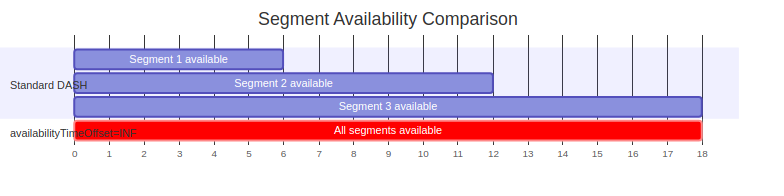
With availabilityTimeOffset="INF", all segments are immediately available. However, to avoid overwhelming the server with requests and triggering HTTP 429 (Too Many Requests) errors, the plugin waits for half the chunk duration before requesting the next segment. This provides a realistic playback simulation while respecting server rate limits.
EXT-X-START Support for Live HLS
What changed ?
The plugin now properly handles the EXT-X-START tag in live HLS manifests. This tag specifies the preferred starting point within the playlist using the TIME-OFFSET attribute.
The EXT-X-START tag indicates a preferred point at which to start playing a Playlist. By default, clients SHOULD start playback at this point when beginning a playback session. […] The value of TIME-OFFSET is a signed-decimal-floating-point number of seconds. A positive number indicates a time offset from the beginning of the Playlist. A negative number indicates a negative time offset from the end of the last Media Segment in the Playlist.
Source: HLS documentation §4.4.2.2
Behavior
| TIME-OFFSET Value | Starting Point |
Positive (e.g., 10.0) | Start 10 seconds from the beginning of the playlist |
Negative (e.g., -30.0) | Start 30 seconds before the live edge |
Previous behavior
The plugin always started 3 chunks before the end, ignoring the manifest’s recommendation.
New behavior
The plugin respects the TIME-OFFSET value, providing a more realistic simulation of actual player behavior.
Manifest examples
Positive offset
#EXTM3U
#EXT-X-TARGETDURATION:6
#EXT-X-VERSION:6
#EXT-X-MEDIA-SEQUENCE:295253097
#EXT-X-START:TIME-OFFSET=25.00
#EXT-X-MAP:URI="/segments/init_video.mp4"
#EXT-X-PROGRAM-DATE-TIME:2026-02-19T16:29:44.916045732Z
#EXTINF:6.00000,
/segments/video_295253097.mp4
#EXTINF:6.00000,
/segments/video_295253098.mp4
#EXTINF:6.00000,
/segments/video_295253099.mp4
#EXTINF:6.00000,
/segments/video_295253100.mp4
#EXTINF:6.00000,
/segments/video_295253101.mp4
#EXTINF:6.00000,
/segments/video_295253102.mp4
#EXTINF:6.00000,
/segments/video_295253103.mp4
#EXTINF:6.00000,
/segments/video_295253104.mp4
#EXTINF:6.00000,
/segments/video_295253105.mp4
#EXTINF:6.00000,
/segments/video_295253106.mp4
In this example, with TIME-OFFSET=25.00, playback starts 25 seconds after manifest start, which corresponds to segment video_295253101.
Negative offset
#EXTM3U
#EXT-X-TARGETDURATION:6
#EXT-X-VERSION:6
#EXT-X-MEDIA-SEQUENCE:295253093
#EXT-X-START:TIME-OFFSET=-25.00
#EXT-X-MAP:URI="/segments/init_video.mp4"
#EXT-X-PROGRAM-DATE-TIME:2026-02-19T16:29:20.324476576Z
#EXTINF:6.00000,
/segments/video_295253093.mp4
#EXTINF:6.00000,
/segments/video_295253094.mp4
#EXTINF:6.00000,
/segments/video_295253095.mp4
#EXTINF:6.00000,
/segments/video_295253096.mp4
#EXTINF:6.00000,
/segments/video_295253097.mp4
#EXTINF:6.00000,
/segments/video_295253098.mp4
#EXTINF:6.00000,
/segments/video_295253099.mp4
#EXTINF:6.00000,
/segments/video_295253100.mp4
#EXTINF:6.00000,
/segments/video_295253101.mp4
#EXTINF:6.00000,
/segments/video_295253102.mp4
In this example, with TIME-OFFSET=25.00, playback starts 25 seconds before the live edge, which corresponds to segment video_295253098.
New utility : Advanced Assertions with ULPVideoAnalysisUtils
Version 10.2.9 introduces the ULPVideoAnalysisUtils utility class, a powerful new tool for creating custom assertions (using JSR223 and groovy for example) in your video streaming performance tests.
What it enables
This utility provides programmatic access to streaming-specific data, allowing you to:
- Identify request types: Distinguish between manifest requests, chunk downloads, and aggregated streaming results
- Extract response headers: Retrieve specific header values for CDN analysis and validation
- Access Quality of experience metrics: Get lag ratio, buffer fill duration, and other Quality of Experience indicators
- Override response codes: Customize error codes based on your business logic for better reporting
Quick example
In the following example, an error will be present in the VideoStreamingSampleResult if the lag ratio exceeds 5%
import com.ubikingenierie.jmeter.plugin.video.client.ULPVideoAnalysisUtils

if (ULPVideoAnalysisUtils.isVideoStreamingSampleResult(prev)) {
    float lagRatio = ULPVideoAnalysisUtils.getLagRatio(prev)
    if (lagRatio > 5.0) {
        AssertionResult.setFailure(true)
        ULPVideoAnalysisUtils.overrideResponseCodeAndMessage(prev, "LAG_TOO_HIGH",
            "Lag ratio " + lagRatio + "% exceeds 5% threshold")
    }
}
Why it matters
With ULPVideoAnalysisUtils, you can implement sophisticated Quality of experience pased pass/fail criteria directly in your JMeter test plans. This means:
- Custom validation rules based on real user experience metrics
- Better visibility in HTML reports with custom response codes
- Differentiated assertions for manifests vs. chunks vs. complete sessions
A dedicated blog post covering this feature in depth will be published soon. Stay tuned for detailed examples, best practices, and advanced use cases for building production-grade video streaming performance tests.
Bug Fixes
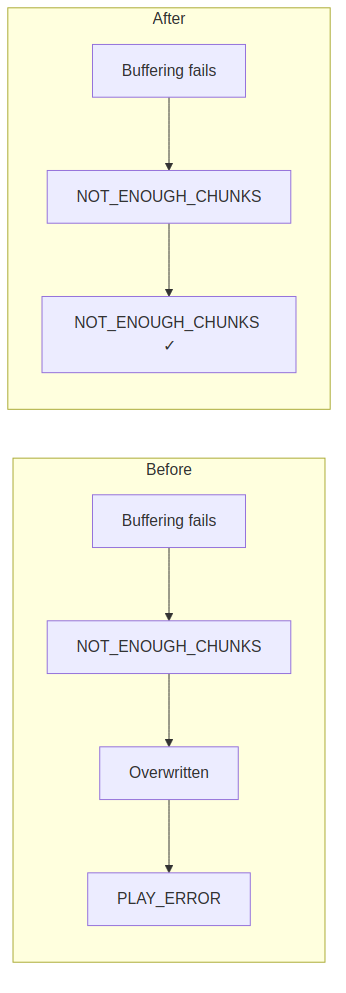
Accurate Error Reporting: NOT_ENOUGH_CHUNKS Preserved
The issue
When a stream didn’t have enough chunks buffered before starting playback, the NOT_ENOUGH_CHUNKS status was being overwritten by a generic PLAY_ERROR, making it difficult to diagnose buffer-related issues.
The fix
The NOT_ENOUGH_CHUNKS status is now correctly preserved and reported in test results, enabling you to:
- Identify buffering issues in your streams
- Distinguish between different types of playback failures
- Fine-tune your CDN and origin configurations
HLS Audio-Only Live Streams
The plugin now correctly handles live HLS manifests containing only audio tracks. This is essential for testing:
- Live radio streaming
- Podcasts delivered via HLS
- Audio-only simulcast streams
VOD Offset Validation
Improvements
Two important validations have been added for VOD (Video on Demand) streams:
- Offset exceeds duration: If you specify a start offset greater than the video duration, the plugin now returns a clear error instead of failing silently.
- Negative offset rejected: Negative offset values are no longer accepted for VOD streams, preventing configuration errors.
| Scenario | Previous Behavior | New Behavior |
| Offset > Video duration | Silent failure | Clear error message |
| Negative offset | Unpredictable | Validation error |
Bandwidth Consistency in AUTO and MANUAL Modes
The issue
In certain edge cases, the plugin was incorrectly switching bandwidth during playback even when configured in AUTO or MANUAL mode. This violated the expected behavior where:
- AUTO mode: The plugin selects the highest available bandwidth at the start and maintains it throughout the session
- MANUAL mode: The plugin uses the user-specified bandwidth consistently
The fix
The bandwidth selection logic has been corrected to ensure stable bandwidth throughout the entire streaming session when using AUTO or MANUAL modes. The selected bandwidth is now properly locked at session start and never changes mid-stream.
| Mode | Behavior | Status |
| AUTO | Highest bandwidth, constant | Fixed |
| MANUAL | User-specified, constant | Fixed |
| ABR (Adaptive) | Dynamic adjustment | Unchanged |
This fix ensures your performance tests accurately measure server performance at consistent quality levels, providing more reliable and reproducible results.
Correct Error Propagation in VideoStreamingSampleResult
The issue
When an error occurred during chunk download, the parent VideoStreamingSampleResult was incorrectly marked as successful while containing a failed child sample. This led to:
- Misleading success rates in reports
- Hidden errors in test analysis
- Incorrect APDEX calculations
The fix
The plugin now correctly propagates errors :
- Parent sample is marked as failed when any child fails
- No orphaned child samples on error
- Accurate success/failure metrics

HLS Interstitials: Playback Accuracy Fixes
This release addresses three issues in HLS Interstitials support, ensuring accurate simulation of ad insertion scenarios during performance testing.
X-ASSET-LIST: Multiple Assets Now Properly Retrieved
The issue
When an interstitial event used X-ASSET-LIST pointing to a JSON containing multiple ad assets, the plugin was only downloading the first asset, ignoring subsequent ones. This led to incomplete ad simulation and inaccurate load metrics.
The value of the X-ASSET-LIST is a quoted-string URL to a JSON object. The JSON object must contain a key/value pair whose key is “ASSETS” and whose value is a JSON array of Asset-Description JSON objects
Source : HLS interstitials specification
Example Asset List
{
    "ASSETS": [
        { "URI": "https://ads.example.com/bumper.m3u8", "DURATION": 5 },
        { "URI": "https://ads.example.com/ad1.m3u8", "DURATION": 30 },
        { "URI": "https://ads.example.com/ad2.m3u8", "DURATION": 15 }
    ]
}
The fix
The plugin now correctly iterates through all assets in the X-ASSET-LIST JSON response, downloading each manifest and its associated segments sequentially. This ensures your load tests accurately reflect the full ad pod delivery, providing realistic traffic patterns for CDN and origin server evaluation.
| Scenario | Previous Behavior | New Behavior |
| 3-asset ad pod | Only 1st asset downloaded | All 3 assets downloaded |
| Pre-roll + mid-roll assets | Partial simulation | Complete ad sequence |
X-RESUME-OFFSET: Main Content Chunks Correctly Skipped
The issue
The X-RESUME-OFFSET attribute specifies how many seconds of main content should be skipped after interstitial playback. When this value was greater than 0 or absent (defaulting to 0 for VOD), the plugin was incorrectly downloading main content chunks that should have been replaced by the interstitial content.
The value of X-RESUME-OFFSET is a decimal-floating-point of seconds that specifies where
primary playback should resume following the playback of the interstitial. It is expressed as a
time offset from where the interstitial playback was scheduled on the primary player timeline. A
typical value for X-RESUME-OFFSET is zero. If the X-RESUME-OFFSET is not present, the play-
er uses the duration of interstitial playback for the resume offset, which is appropriate for live
playback where playback is to be kept at a constant delay from the live edge, or for VOD play-
back where the HLS interstitial is intended to replace content in the primary asset.Source : HLS interstitials specification
The problem illustrated
Main content timeline:  [chunk1][chunk2][chunk3][chunk4][chunk5][chunk6]
                               ↑               ↑
                          interstitial    resume point
                            start        (X-RESUME-OFFSET)

Previous: Downloaded chunk2, chunk3, chunk4 AND interstitial content
Fixed:    Downloads only interstitial content, skips chunk2-4
The fix
The plugin now properly respects X-RESUME-OFFSET:
- Calculates which main content chunks fall within the interstitial window
- Skips downloading those chunks entirely
- Resumes main content download at the correct position after interstitial playback
This fix ensures accurate byte counts, realistic bandwidth consumption, and proper server load distribution between main content and ad servers.
VOD Streams: Pre-Roll AND Mid-Roll Interstitials Now Processed
The issue
For VOD streams containing both pre-roll (CUE="PRE") and mid-roll interstitials, the plugin was only processing pre-roll content, completely ignoring mid-roll ad breaks. This resulted in:
- Incomplete ad server load testing
- Missing revenue-critical mid-roll impressions in simulations
- Inaccurate total playback duration metrics
Manifest example
#EXTM3U
#EXT-X-TARGETDURATION:6
#EXT-X-PLAYLIST-TYPE:VOD
#EXT-X-PROGRAM-DATE-TIME:2026-03-01T10:00:00.000Z

#EXT-X-DATERANGE:ID="preroll",CLASS="com.apple.hls.interstitial",START-DATE="2026-03-01T10:00:00.000Z",CUE="PRE",X-ASSET-URI="https://ads.example.com/preroll.m3u8",DURATION=15.0

#EXTINF:6.000,
segment1.ts
#EXTINF:6.000,
segment2.ts

#EXT-X-DATERANGE:ID="midroll1",CLASS="com.apple.hls.interstitial",START-DATE="2026-03-01T10:00:12.000Z",X-ASSET-URI="https://ads.example.com/midroll.m3u8",DURATION=30.0

#EXTINF:6.000,
segment3.ts
...
#EXT-X-ENDLIST
The fix
The plugin now maintains proper state tracking across the entire VOD playback session, ensuring:
- Pre-roll interstitials are played before main content
- Mid-roll interstitials are triggered at their designated
START-DATE - Post-roll interstitials (if present) are processed after main content
| Interstitial Type | Previous Behavior | New Behavior |
Pre-roll (CUE="PRE") | Processed | Processed |
| Mid-roll | Ignored | Processed |
Post-roll (CUE="POST") | Ignored | Processed |
This fix is essential for accurately simulating viewer journeys through ad-supported VOD content, ensuring your performance tests reflect real-world ad delivery patterns.
Summary
Version 10.2.9 brings crucial improvements for testing modern streaming architectures:
| Feature | Benefit |
| EXT-X-MAP support | Accurate simulation of fMP4/CMAF HLS streams |
| availabilityTimeOffset=”INF” | Proper low-latency DASH testing |
| EXT-X-START | Realistic live stream playback positioning |
| NOT_ENOUGH_CHUNKS fix | Better error diagnosis |
| Audio-only live HLS | Testing podcasts and radio streams |
| VOD offset validation | Prevent misconfigurations |
| Error propagation fix | Accurate success/failure metrics |
| Bandwidth consistency fix | Reliable AUTO/MANUAL mode testing |
| ULPVideoAnalysisUtils | Custom Quality of experience based assertions |
| X-ASSET-LIST multi-asset fix | Complete ad pod simulation |
| X-RESUME-OFFSET fix | Accurate main content skipping |
| VOD pre/mid-roll fix | Full interstitial coverage |
Getting Started
Upgrade to version 10.2.9 to take advantage of these improvements. For detailed documentation and examples, visit our support portal.
References
HLS Specifications
- RFC 8216bis – HTTP Live Streaming 2nd Edition: draft-pantos-hls-rfc8216bis-20
- Section 4.4.4.5: EXT-X-MAP tag specification
- Section 4.4.2.2: EXT-X-START tag specification
- Section 3.1.2: Fragmented MPEG-4 requirements
About UbikLoadPack :

- Ubik Load Pack is used by Big players in the Video streaming field
- We provide professional services for Load Testing
- Learn more about our streaming plugin
- Detailed features of UbikLoadPack Streaming Solution
- Get a Free trial
You’ll probably also like :
- Performance Testing Low Latency Dash servers with UbikLoadPack
- Performance Testing Low Latency HLS servers
- Load testing MPEG-DASH Video Streaming with Apache JMeter and UbikLoadPack
- Video Streaming: CMAF and Low-Latency
- Cases studies
Latest posts
- UbikLoadPack Video Streaming Plugin 10.2.9
- GWT Performance Testing : Why UbikLoadPack is the Strategic Choice for Your Organization
- Make reliable business decisions based on realistic video streaming performance testing
- UbikLoadPack Video Streaming Plugin 10.2
- UbikLoadPack Video Streaming Plugin 10.1.1
UbikLoadPack solution



Publication